
How to Choose a Payment Gateway: A Merchant's Decision Framework
When selecting a payment gateway, the stakes are high. A slow or unreliable gateway can lead to abandoned carts and lost revenue. On the flip side, the right gateway ensures smooth transactions, protects against fraud, and scales with your business. Here’s a quick breakdown to guide your decision:
- Understand Your Needs: Consider transaction volume, business type (e.g., subscription vs. retail), and geographic reach.
- Compare Fees: Look at flat rates, interchange-plus models, and hidden costs like chargeback fees or currency conversion charges.
- Prioritize Security: Ensure compliance with PCI DSS standards, encryption, and fraud prevention tools like tokenization.
- Test Integration: Check for easy setup, API support, and compatibility with your platform.
- Evaluate Support: Opt for providers with 24/7 customer service and transparent pricing.
How to Choose The Best Payment Gateway | Step-by-Step
sbb-itb-5d40823
Step 1: Identify Your Business Requirements
Before diving into payment gateway comparisons, it's crucial to have a clear understanding of your business needs. A subscription box service, for example, will require a completely different setup than a high-ticket electronics retailer. Start by focusing on three key areas - processing volume, business model, and geographic requirements - to help steer your decision-making process.
Calculate Your Transaction Volume and Frequency
The volume and frequency of your transactions play a big role in determining the best pricing model for your business. If you're processing more than $100,000 per month, options like interchange-plus pricing or volume discounts often provide better value than flat-rate pricing. On the other hand, smaller businesses handling less than $10,000 monthly may find the standard 2.9% + $0.30 flat rate simpler and more predictable.
Average transaction size is another factor to consider. For businesses with high-value transactions (e.g., over $500), look for gateways that support higher transaction limits and explore Account-to-Account (A2A) payments, which offer lower fees - typically around 0.5-1%, compared to card-based fees. On the flip side, if you handle lots of small payments, like $5 coffee orders, those fixed $0.30 fees can quickly eat into your margins. Negotiating lower fees for high-frequency transactions can make a big difference.
"82% of small business failures are attributed to poor cash flow management." - Razorpay
Settlement speed is another important consideration. Most gateways settle funds within two to three days (T+2 or T+3), but if your cash flow is tight, look for faster options like T+1 or even same-day settlements. To get a clearer picture of your costs, project your transaction volumes and compare them against the gateway's rates, monthly minimums, and any additional fees.
Match the Gateway to Your Business Type
Different types of businesses require different payment gateway features. For subscription-based businesses, automated recurring billing, trial period management, and smart dunning (retrying failed payments due to expired cards or other issues) are must-haves. Without these tools, you risk losing revenue to involuntary churn.
For e-commerce stores, focus on features like one-click checkouts and support for digital wallets such as Apple Pay or Google Pay. These tools can significantly reduce cart abandonment rates. If your business operates both online and in physical locations, look for a gateway that offers integrated Point-of-Sale (POS) hardware and a unified dashboard to manage all sales channels in one place.
Another key factor is how much control you want over the checkout experience. Hosted gateways like PayPal are easy to set up but redirect customers away from your site, which can disrupt the user experience. API-based gateways like Stripe, on the other hand, allow you to keep the entire checkout process on your domain, maintaining your branding. Many startups start with hosted solutions for simplicity and later switch to API-based options as they grow.
Determine Your Geographic Coverage Needs
If your business serves customers outside the United States, it's essential to ensure your payment gateway supports their preferred payment methods and currencies. According to research, 65% of shoppers abandon their carts if their preferred payment method isn't available. For example, European shoppers often use iDEAL or SEPA bank transfers, Brazilians rely on PIX, and Indian customers prefer UPI. Credit cards aren't always the default choice.
You'll also want to confirm that the gateway supports multiple currencies and offers competitive conversion rates. Some providers, like Adyen, charge a modest 0.5% markup for currency conversion, while others, like PayPal, may charge as much as 3-4%. Additionally, cross-border transactions often add an extra 1% to 1.5% to your domestic processing fees.
A good rule of thumb is the 5% rule: when revenue from a specific country surpasses 5% of your total income, consider integrating a local payment gateway for that region. Using a local gateway improves authorization rates because transactions appear domestic to customers' banks. For businesses operating in high-regulation areas like the EU, a Merchant of Record service can handle local tax compliance and VAT requirements on your behalf.
Step 2: Analyze Transaction Fees and Pricing
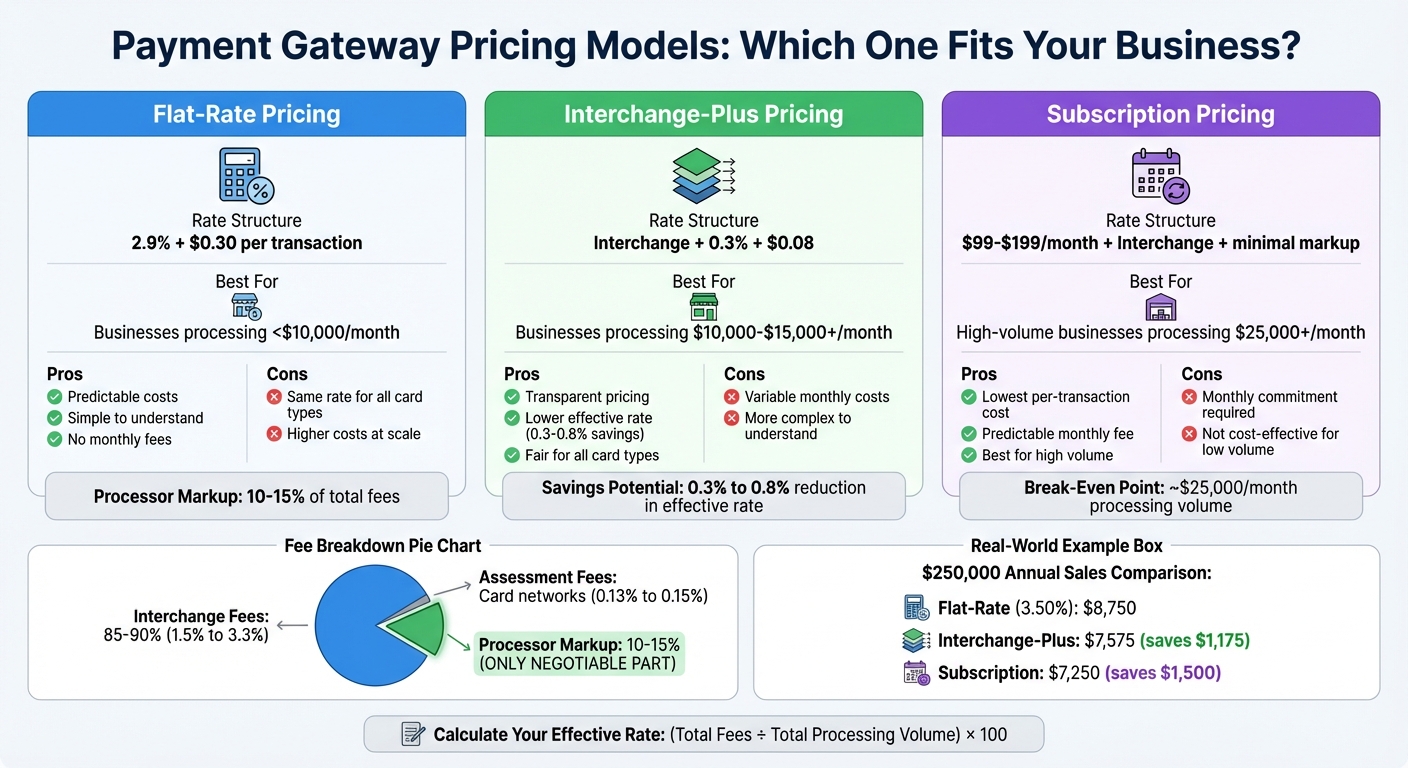
Payment Gateway Pricing Models Comparison: Flat-Rate vs Interchange-Plus vs Subscription
Once you've evaluated your transaction volume and business type, it's time to dive into fee structures. Even a small rate difference - like 0.6% on $250,000 in annual sales - can mean saving over $1,000 each year. That seemingly minor gap between 2.9% and 3.49% adds up fast when you're handling thousands of transactions. To keep costs in check, take a close look at the available pricing models and figure out which one fits your business best.
Understand the Main Fee Structures
Payment processing fees break down into three parts. Interchange fees (1.5% to 3.3%) go to the bank that issued your customer's card, while assessment fees (0.13% to 0.15%) are paid to card networks like Visa and Mastercard. The processor markup - the only negotiable part - makes up 10% to 15% of your total fees, while interchange and assessment fees account for the remaining 85% to 90%.
Here are the main pricing models to consider:
- Flat-rate pricing: This is straightforward - one fixed percentage plus a per-transaction fee (e.g., 2.9% + $0.30). It’s ideal for businesses processing less than $10,000 per month because of its predictability [22,25]. However, you’ll pay the same rate whether a customer uses a basic debit card or a premium rewards card.
- Interchange-plus pricing: This separates wholesale costs from the processor's markup (e.g., "Interchange + 0.3% + $0.08"). It's a more transparent option and often cheaper for businesses processing over $10,000 to $15,000 monthly, potentially lowering your effective rate by 0.3% to 0.8% [22,25].
- Subscription pricing: With this model, you pay a monthly fee (usually $99 to $199) plus interchange with little or no markup. It's best for high-volume businesses handling over $25,000 per month. However, avoid tiered pricing, which categorizes transactions into "qualified" and "non-qualified" rates - it’s often criticized for being misleading [22,25].
Look Out for Extra Fees
Beyond the standard rates, there are other fees to watch for that can eat into your profits:
- Chargeback fees: These range from $0 (with Square) to $25 (with PayPal). Some processors refund the fee if you win the dispute, while others don’t [28,23].
- Cross-border and currency conversion fees: Selling internationally? Be prepared for a 1% to 1.5% cross-border surcharge and a currency conversion fee of 1% to 4%, depending on the processor (e.g., Stripe charges 1%, while PayPal charges up to 4%) [28,30].
- Fixed per-transaction fees: These can hurt margins on small-ticket items. For instance, a $0.30 fee on a $20 sale adds an extra 1.5%, turning a 2.9% rate into 4.4%.
- Annual, early termination, and regulatory fees: Annual fees can range from $50 to $300, early termination fees can hit $200 to $500, and regulatory fees might add $5 to $50 per month.
- Refund policies: Many processors keep the original transaction fee even when you issue a refund, which can further cut into your margins.
For businesses handling invoices, Stripe’s 0.4% fee per paid invoice (capped at $2) can be much more affordable than PayPal or Square, which charge their full online rates of 3.3% to 3.49% [28,23].
Create a Fee Comparison Chart
To find the best payment gateway for your business, calculate your effective rate with this formula:
(Total Fees Paid ÷ Total Processing Volume) × 100.
Build a comparison chart using three scenarios: your current monthly volume, double that volume, and five times your current volume. This will help you see when switching to a subscription or interchange-plus model makes sense [23,25].
For example, if you generate $250,000 in annual sales, Stripe or Square might cost around $8,750 (3.50% effective rate), while PayPal could cost $9,925 (3.97%). That’s a $1,175 difference, with PayPal’s higher fixed fees driving up costs. For large B2B transactions, ACH bank transfers - often capped at around $5 - are often a more affordable alternative to credit cards [23,27].
If your processing volume exceeds $50,000 to $80,000 per month, use your comparison chart to negotiate custom rates. A reduction of just 0.2% to 0.5% in your effective rate can lead to substantial savings [27,30]. Also, batch transactions within 24 hours to avoid being categorized as higher-risk, which can result in higher fees.
Step 3: Review Security and Compliance Standards
Once you've settled on fees, it's time to focus on security - a critical factor when choosing a payment gateway. Why? Because the stakes are high. In the U.S., a single data breach costs businesses an average of $9.5 million. Since 2005, more than 10 billion consumer records have been exposed in over 9,000 data breaches. Beyond financial losses, security lapses can scare off customers - 25% of shoppers abandon their carts if they feel your site isn't secure. This step builds on your fee analysis by addressing risks and ensuring compliance with industry standards.
Verify PCI DSS Certification
The Payment Card Industry Data Security Standard (PCI DSS) is a global framework businesses must follow if they handle cardholder data. It includes 12 key requirements, like using firewalls, encrypting data, and restricting physical access to sensitive information. With Version 4.0 coming into effect in March 2025, the standard has raised the minimum password length from seven to 12 characters.
When evaluating gateways, prioritize those with PCI Level 1 Service Provider status, which requires annual independent audits to meet the highest security tier. Opt for solutions like Hosted Checkout or Embedded Payment Elements (iframes) to avoid handling card data directly. This allows you to qualify for the simpler SAQ A (about 22 requirements) instead of the more complex SAQ D (300+ requirements). If you handle in-person payments, make sure the gateway supports PCI-validated Point-to-Point Encryption (P2PE), which encrypts data from the moment of capture until it is securely decrypted. Finally, explore the fraud prevention tools offered by the gateway to further secure your transactions.
Check Fraud Prevention Features
Fraud prevention is essential, and payment gateways use tools like encryption and tokenization to protect transactions. Encryption converts sensitive data, like credit card numbers, into unreadable formats during transmission and storage. Tokenization goes a step further by replacing card data with unique, non-sensitive "tokens" that can't be reverse-engineered. Even if a breach occurs, tokens keep your business safe.
"Handling tokens rather than raw payment data can simplify the process of complying with industry standards, such as PCI DSS, because tokens fall outside the purview of many regulatory requirements." - Stripe
By 2024, 60% of merchants had adopted tokenization, which has reduced fraud by 30% for major networks like Visa. Additionally, 71% of financial institutions now rely on AI-driven tools to combat evolving fraud tactics. Look for gateways offering real-time fraud detection features like IP tracking, geolocation, and velocity checks to block suspicious activity. Also, use webhook verification to ensure payment notifications are legitimate and not from malicious actors.
Assess Chargeback Management Tools
Chargebacks can be a major drain on your revenue. For every dollar lost to fraud, businesses spend an average of $3.13 on fees, merchandise replacement, and other costs. Advanced payment gateways offer tools to help you manage disputes proactively. Features like real-time alerts can help you address issues before they escalate into formal chargebacks.
Some gateways also provide automated evidence collection, pulling data like transaction details, invoices, and shipping confirmations to build strong dispute responses. AI-powered representment tools analyze reason codes and historical trends to craft effective responses tailored to specific card networks.
For example, in 2024, sports retailer Fanatics recovered over $800,000 in revenue in just one year using Chargeflow's automated platform. This not only doubled their chargeback win rate but also saved them 25+ hours per week in manual work. Similarly, Wordtune achieved a 4.3x increase in their win rate and hit a 100% on-time submission rate, eliminating the need for manual management entirely.
Choose gateways that offer root-cause analytics to uncover patterns in chargebacks - whether it's specific products, regions, or shipping delays - and address the underlying issues. Tools with deadline management ensure all dispute responses are submitted within the strict timeframes set by card issuers. Keeping your chargeback ratio below the 1% threshold is crucial to avoid being flagged for high-risk monitoring by Visa or Mastercard. Effective chargeback management not only protects your revenue but also strengthens your overall gateway strategy.
Step 4: Test Integration and Growth Capacity
Once you've analyzed fees and ensured security compliance, it's time to focus on integration and scalability. A payment gateway that integrates smoothly with your systems and scales as your business grows is essential for long-term success. Did you know that 22% of customers abandon purchases due to slow or complicated checkout processes? Another 13% leave if they don’t see enough payment options. The right integration can help you avoid these losses while preparing your business for expansion.
Verify API and Plugin Support
When selecting a gateway, check if it offers native plugins tailored to your platform. For instance, WooCommerce and Shopify users should look for official integrations to streamline the process. If you have a custom-built system, evaluate the gateway’s RESTful API, SDKs, and webhooks to ensure real-time updates on order statuses.
"Choosing and configuring payment gateways is one of the most consequential decisions you will make for your WooCommerce store." – Can Bayar, WordPress Expert
For businesses operating both online and physical stores, gateways like Square or Shopify Payments are great options. They unify inventory and sales management across channels, making operations seamless. Always test integrations in a sandbox environment before going live to avoid unexpected issues.
But integration is just the start - your gateway should also grow alongside your business.
Choose a Gateway That Grows With You
Opt for modular gateways like Stripe or Checkout.com, which allow you to add features as your needs evolve. These might include subscription management, fraud detection, or multi-currency support. For example, in April 2026, Checkout.com reported that its "Intelligent Acceptance" feature generated over $350,000 in extra revenue for clients, improved acceptance rates by 1.50%, and saved 2 million failed payments.
If international sales are part of your plan, choose a gateway that handles multi-currency settlements and supports local payment methods. Stripe, for instance, supports over 135 currencies and regional options like iDEAL and SEPA. For subscription-based businesses, look for tokenization capabilities for one-click checkouts and automated retry logic for failed payments. With mobile wallets expected to handle over 50% of U.S. eCommerce transactions by 2026, integrating Apple Pay and Google Pay is no longer optional. Stripe’s optimized checkout tools, for example, boosted sales by 7.4% in early 2026 by simplifying the payment process.
Choosing a gateway that adapts to your growth ensures you're ready for future challenges.
Review the Setup Process
Finally, consider how easy it is to set up the gateway. A complicated setup can delay your launch and frustrate your team. Look for providers with clear documentation and straightforward installation guides. Hosted (redirect) integrations are often simpler because they handle PCI compliance on the provider’s servers. However, they may redirect customers off your site, potentially increasing friction. On the other hand, direct (on-site) integrations - like Stripe Elements - keep customers on your page, offering a smoother experience while reducing PCI compliance requirements.
Support is another critical factor. Choose providers offering 24/7 phone or live chat support to resolve issues quickly. Public status pages are also helpful for monitoring uptime and scheduled maintenance. For high-volume businesses, prioritize gateways with a proven 99.999% uptime record and the ability to handle traffic spikes during peak times. Settlement schedules are another consideration - while the standard is 2–5 business days, some providers offer instant or same-day payouts for an extra fee.
Step 5: Check Customer Support and Clear Pricing
Once you've confirmed your gateway's integration and scalability, it's time to evaluate two critical aspects: customer support and pricing transparency. These factors ensure smooth operations and help you avoid unexpected disruptions or financial surprises. After all, issues with payments can bring your business to a standstill, creating significant operational challenges.
Confirm Support Hours and Response Times
During your sandbox testing phase, take the opportunity to assess the quality of the provider's customer support. Check whether they offer 24/7/365 availability and have a clear escalation process in place. It's crucial to have access to knowledgeable human support rather than relying solely on automated systems.
"Payment issues can grind your business to a halt. If you don't have a dedicated engineering team, weak support can make you lose money." – Miguel Rebelo, Zapier
Find out if round-the-clock technical support is included in the standard package or if it requires an additional service contract. Look for Service Level Agreements (SLAs) that define response and resolution times. Also, check if the provider offers public status pages where you can monitor system health and updates.
Look for Clear Pricing Information
Transparent pricing is essential for managing your budget effectively. Ensure that the fee structure is straightforward and aligns with the scale of your business. Don’t just focus on the advertised "qualified" rates - dig deeper to understand the complete fee structure.
Be on the lookout for hidden charges, such as annual fees, regulatory costs, or early termination penalties. Considering U.S. businesses paid an estimated $187.2 billion in processing fees in 2024, even a small difference in rates can have a big impact. For instance, a 0.5% rate reduction could save $5,000 for every $1 million in revenue. Request a detailed breakdown of all fees from potential providers so you can make an informed comparison.
Check for Regular Feature Updates
Support and pricing are important, but don't overlook how often the provider updates its platform. Regular updates ensure you stay ahead with the latest technologies and security measures. Ideally, choose a gateway that rolls out updates every two weeks.
Frequent updates not only keep you equipped with emerging payment methods like Buy Now, Pay Later (BNPL) - expected to surpass $100 billion in the U.S. by 2026 - but also enhance fraud prevention tools, such as AI-powered detection and 3D Secure 2.0 biometric verification.
To gauge how proactive the provider is, review their API changelog to see how often they introduce new features or improvements. Providers that update regularly are more likely to support trends like mobile wallets, which are projected to handle over 50% of U.S. eCommerce transactions by 2026. They may also include advanced tools like smart dunning management to reduce involuntary churn caused by expired payment methods.
Conclusion
Picking the right payment gateway requires careful consideration of five key factors: your business needs, total cost, security, integration, and the quality of support.
To make the best choice, align the gateway's features with both your current demands and future goals. For instance, if you're running a subscription-based service, look for features like recurring billing and smart dunning. Expanding into international markets? Ensure the gateway supports multi-currency transactions and local payment methods. With e-commerce forecasted to make up nearly 21% of global retail sales by 2026, scalability should also be a priority.
The decision shouldn't hinge solely on fees. User experience and technology play a huge role. Did you know 25% of shoppers abandon their carts if they don't trust the site with their credit card details? That makes features like tokenization and AI-driven fraud detection must-haves. Plus, checkout speed is just as important - every one-second delay in page loading can cut conversions by 7%.
"Selecting the right payment gateway is a critical decision for any business. It's not just about processing payments; it's about building customer trust and maximizing revenue." – Razorpay
Before committing, test the gateway thoroughly in a sandbox environment. Check how responsive their support team is and confirm that payout timelines align with your cash flow needs. The gateway you choose now should not only meet your current needs but also support your growth over the next three to five years.
FAQs
When should I switch from flat-rate to interchange-plus pricing?
When your transaction volume grows to a point where the savings from interchange-plus pricing outweigh flat-rate fees, it might be worth making the switch. Interchange-plus pricing breaks down costs by separating interchange fees from processor markups. This structure often results in lower overall costs for businesses handling large volumes or accepting a wide variety of card types. If you're currently paying flat-rate fees - like 2.9% + $0.30 per transaction - and those charges are higher than what you'd pay with interchange-plus, it’s a good indicator that a change could benefit your bottom line.
How can I estimate my true effective processing rate?
To figure out your true effective processing rate, you need to go beyond just the advertised fees. Take into account all associated costs, such as:
- Transaction fees: The per-transaction charges you pay.
- Reconciliation efforts: Time and resources spent on tasks like matching payments or handling chargebacks.
- Fraud prevention: Costs tied to tools or measures to protect against fraud.
- Operational overhead: Expenses for things like system integration, customer support, or maintenance.
By combining these factors, you can calculate a more realistic rate. This will give you a clearer picture of your actual expenses and help you make smarter decisions to manage your processing costs effectively.
What’s the easiest way to reduce PCI compliance work?
Using a payment gateway or checkout solution that handles the bulk of PCI DSS requirements is the simplest way to cut down on PCI compliance work. Choose a gateway that offers advanced security measures like tokenization and encryption. These features ensure that sensitive card data never touches your systems, drastically reducing your PCI scope. This not only lightens your compliance workload but also ensures transactions remain secure.