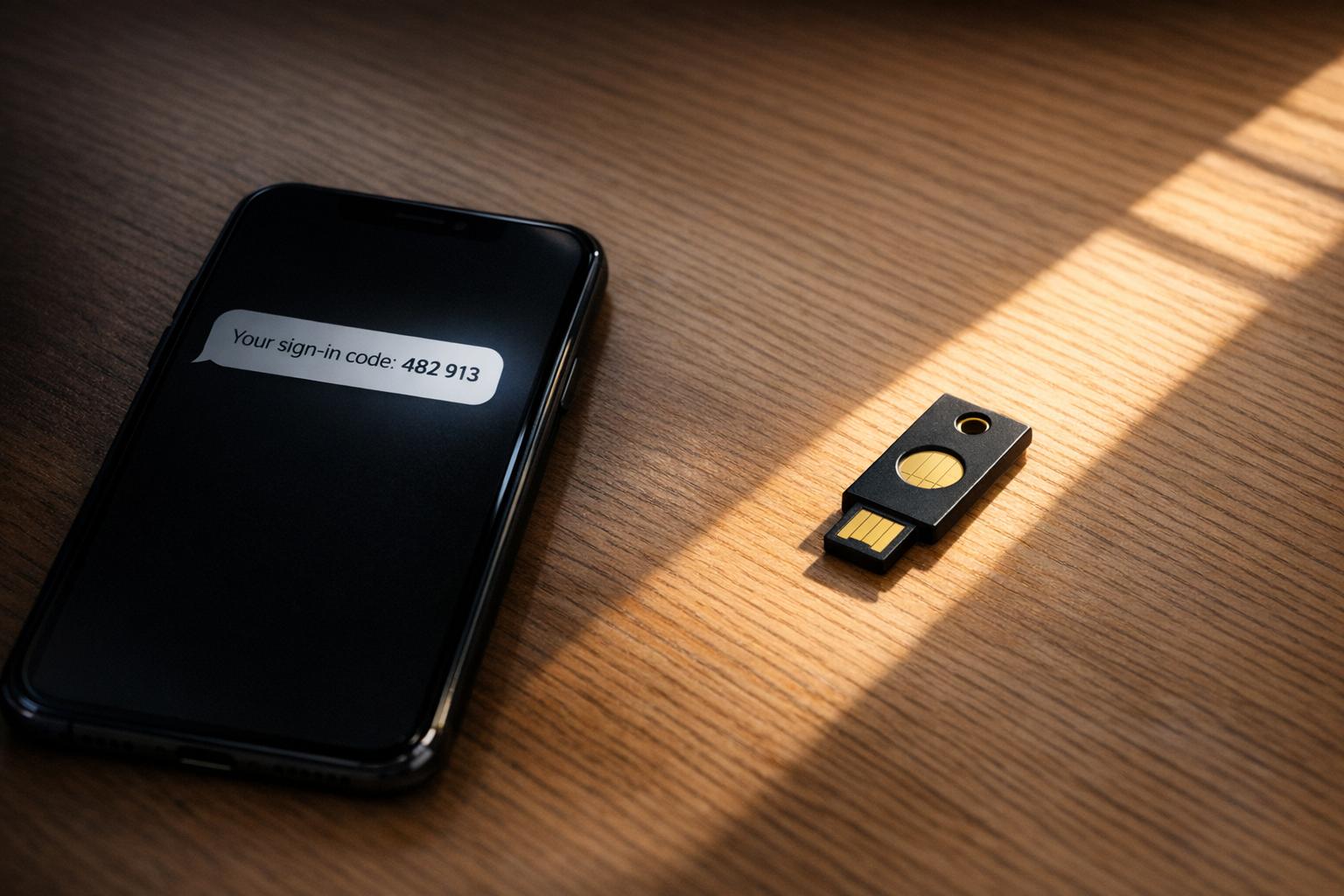
Two-Factor Authentication: Why SMS Is the Weakest Link
SMS-based two-factor authentication (2FA) is outdated and insecure. It relies on old technology like the SS7 protocol, which lacks encryption, making it vulnerable to interception, SIM swapping, and phishing attacks. These weaknesses have led to millions of dollars in financial losses and regulatory bans in countries like India and the UAE. Better alternatives, such as app-based authenticators, hardware security keys, and passkeys, offer far stronger protection. For example, hardware keys block 100% of targeted attacks compared to SMS, which stops only 76%. Switching to these methods is essential for safeguarding sensitive accounts and transactions.
Major Security Flaws in SMS Two-Factor Authentication
SIM Swapping Attacks
SIM swapping is a scam where attackers manipulate mobile carriers into transferring a victim's phone number to a SIM card they control. This works because many carriers have weak verification processes, making it easier for attackers to impersonate their targets.
Once the swap is successful, your phone loses service, and the attacker gains access to your calls and text messages. This includes the one-time passwords (OTPs) used for securing accounts like email, banking, and cryptocurrency. Shockingly, SIM swapping has become a service offered on the dark web, with prices ranging from $10 to $100 per target [3]. According to the FBI's 2024 Internet Crime Report, there were 982 reported SIM-swap cases, leading to an estimated $26 million in direct financial losses [4]. In the UK, the problem has grown even more severe, with Cifas reporting a staggering 1,055% increase in unauthorized SIM swaps in 2024 alone [4]. These statistics highlight just how unreliable SMS is for safeguarding critical transactions.
SMS Message Interception
SIM swapping isn’t the only way attackers exploit SMS vulnerabilities. Many take advantage of flaws in the transmission process itself. For example, SMS messages are sent using the outdated SS7 protocol, which lacks encryption. This allows attackers with access to telecom networks to intercept messages in transit.
A major example of this vulnerability was seen in the "Salt Typhoon" cyber espionage campaign. Between 2024 and 2025, this group breached at least eight U.S. telecom providers, including major names like AT&T and Verizon, to access calls and SMS content from targeted individuals [4]. In some cases, state-sponsored actors have even accessed SMS traffic directly through carrier infrastructure.
Another tactic involves using rogue base stations to force smartphones to downgrade from secure LTE or 5G connections to the older and weaker 2G GSM networks. These outdated networks lack modern encryption, making SMS messages vulnerable to interception by anyone with the necessary tools.
Phishing and Social Engineering Tactics
Attackers don’t always rely on technical exploits - they also use psychological tricks to bypass SMS-based security. Modern phishing campaigns can completely sidestep SMS authentication by fooling users into entering OTPs on fake websites. Tools like Evilginx and Modlishka act as reverse proxies, capturing both the user’s password and their SMS code in real time. Once the attacker has this information, they can immediately access the victim's account.
A high-profile example of this occurred in September 2023, when MGM Resorts suffered an estimated $100 million in damages after a cyberattack. The breach started with a simple 10-minute call to an IT help desk, where attackers impersonated an employee using details found on LinkedIn [3]. This incident exposed a critical flaw: SMS codes are not tied to specific websites. A code generated for one site can be misused on another that looks similar, making phishing attacks even more dangerous.
sbb-itb-5d40823
Stop Using SMS 2FA - Why Your Accounts Aren't Safe Anymore
How SMS 2FA Compares to Secure Authentication Methods
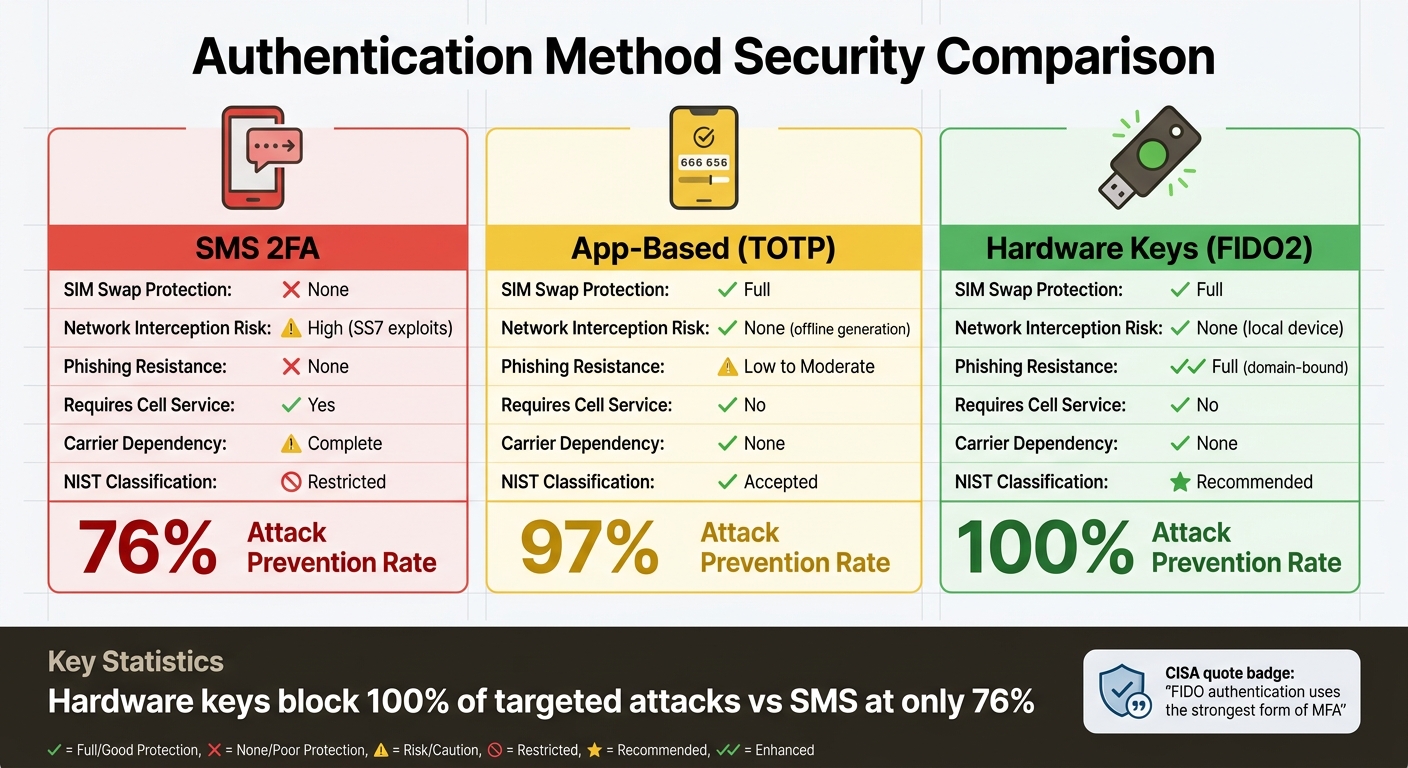
SMS vs Secure 2FA Methods: Security Comparison Chart
Given these weaknesses, comparing SMS-based two-factor authentication (2FA) with newer methods shows why it's time to consider stronger alternatives.
Main Failures of SMS Authentication
SMS authentication has three major flaws that make it unreliable for securing sensitive accounts. First, it relies entirely on the security of your mobile carrier - something you have no control over. If attackers manage to convince a carrier employee to transfer your number to their SIM card, your account security is immediately compromised. Second, SMS codes aren’t tied to specific websites, which means a code intended for your legitimate bank could be intercepted and used on a phishing site in seconds. Third, unlike modern methods that generate codes locally or use advanced cryptographic techniques, SMS codes travel across multiple network systems, creating numerous opportunities for interception.
For businesses, the risks don’t stop at fraud. The financial burden of SMS authentication is significant. For instance, a company with 500,000 active users per month might end up spending over $100,000 annually just on SMS delivery fees [3].
Authentication Method Comparison
The contrast between SMS and modern authentication methods is striking. Here’s a breakdown:
| Feature | SMS 2FA | App-Based (TOTP) | Hardware Keys (FIDO2) |
|---|---|---|---|
| SIM Swap Protection | None | Full | Full |
| Network Interception Risk | High (SS7 exploits) | None (offline generation) | None (local device) |
| Phishing Resistance | None | Low to Moderate | Full (domain-bound) |
| Requires Cell Service | Yes | No | No |
| Carrier Dependency | Complete | None | None |
| NIST Classification | Restricted | Accepted | Recommended |
App-based authenticators, like those using Time-Based One-Time Passwords (TOTP), generate codes directly on your device from a shared secret. This eliminates the need for codes to travel over a network. Hardware keys take security even further by using cryptographic signatures tied to specific websites, making them phishing-resistant. These differences have led to a strong push toward adopting these more secure alternatives.
Security Standards and Industry Changes
The security community has made its stance on SMS authentication clear. In July 2025, the National Institute of Standards and Technology (NIST) officially classified SMS and phone-based one-time passcodes as "restricted" authenticators in its SP 800-63-4 guidelines [3] [4]. This means federal agencies must now formally document risks if they choose to continue using SMS for authentication.
"SMS-based 2FA was a reasonable security measure a decade ago. In 2026, it's one of the weakest forms of account protection still in widespread use." - Authn8 [2]
Regulators worldwide are also phasing out SMS-based authentication. The UAE Central Bank has set a March 2026 deadline for financial institutions to stop using SMS OTPs, with the Reserve Bank of India and the Bangko Sentral ng Pilipinas following suit in April and June 2026, respectively [3]. Meanwhile, tech giants like Apple, Google, and Microsoft are championing FIDO2 passkeys. This passwordless authentication method eliminates shared-secret vulnerabilities altogether. By 2026, approximately 15 billion online accounts support passkeys, and 87% of enterprises are actively rolling them out [4]. The shift is undeniable.
Secure Alternatives to SMS Two-Factor Authentication
SMS authentication has its flaws, leaving room for stronger, more reliable options. These alternatives address the vulnerabilities associated with SMS, offering better security and practical benefits. Here's a closer look at some of the top choices.
App-Based Authenticators
Apps like Google Authenticator or Authy generate time-based one-time passwords (TOTP) directly on your device. Unlike SMS codes that travel through carrier networks, these six-digit codes are created locally using a shared secret and the current time. This approach eliminates the risks tied to network transmission, such as SS7 exploits and SIM swapping.
While authenticator apps provide better security than SMS, they aren't foolproof. For instance, entering a code on a phishing site still poses a risk. However, they remain a popular choice due to their accessibility - they're free, work offline, and are useful even in areas with weak cell service.
Hardware Security Keys
Physical security keys, like YubiKey, set the gold standard for security. These small USB or NFC devices use cryptographic signatures linked to specific websites. Here's how they work: when you log into, say, your bank account, the key verifies the domain before generating a response. If you're on a phishing site, the key won't respond because it checks for the correct domain.
"FIDO authentication uses the strongest form of MFA and is effective against MFA bypass techniques." - CISA (Cybersecurity and Infrastructure Security Agency) [1]
Research by Google showed that hardware security keys blocked 100% of targeted attacks [2]. While the upfront cost of these devices ranges from $20 to $75, the level of protection they offer is well worth it - especially for safeguarding sensitive accounts or administrative access. Just remember to store a backup key in a safe place in case you lose your primary one.
Passkeys: Passwordless Authentication
Passkeys take security to the next level by offering a passwordless experience. Built on cryptographic principles similar to hardware keys, passkeys store public-key cryptography in your device's secure enclave. They unlock using biometrics or a PIN and are domain-specific, making them useless on phishing sites.
By 2026, 15 billion online accounts are expected to support passkeys, with 87% of enterprises actively adopting them [4]. In May 2026, HubSpot reported a 25% improvement in login success rates and a 4x boost in login speed after introducing passkeys for users [3]. Similarly, Google saw a 120% increase in passkey authentications after making them the default for new accounts [3].
These alternatives address SMS vulnerabilities directly, offering stronger protection for sensitive tasks like financial transactions and administrative access.
How to Switch to More Secure Two-Factor Authentication
Steps to Replace SMS with Secure 2FA
Start by locking down your primary email account. This is critical since it often controls password resets for many of your online services [10][11]. After that, focus on securing accounts tied to finances, password managers, or any platforms holding sensitive information [6][9].
If you're switching to an authenticator app, begin by downloading a trusted app like Ente Auth, Aegis, or 2FAS [5][9]. Next, go to your account's security settings, disable SMS 2FA, and choose the authenticator app option. Scan the provided QR code, input the generated code, and save any backup codes in a secure place like your password manager or a physical safe. Finally, remove your phone number from the account to block attackers from using it as a recovery method [5][6][7][9].
For those opting for hardware security keys, buy both a primary and a backup key [5][9]. To set them up, visit your account's security settings, select "Security Key" or "Add Hardware Key", and follow the prompts - this typically involves inserting the key via USB or tapping it with NFC, then pressing a button to register it. Store your backup key in a separate, secure location for emergencies [6][7][9][11].
Reducing Payment Disputes with Better Authentication
Upgrading to stronger authentication methods doesn’t just protect your accounts - it also provides cryptographic proof of your identity. This proof can be invaluable in resolving payment disputes, as it helps establish whether you authorized a transaction. According to research from 2024, SMS-based 2FA stops 76% of targeted attacks, while app-based 2FA blocks 97%, and hardware keys prevent 100% [9]. That difference is significant, especially considering the FBI reported 982 SIM-swap complaints in 2024, leading to $26 million in direct losses [4].
Services like DidIBuyIt become even more effective when paired with secure authentication. Features like real-time alerts for login attempts and transactions help you catch unauthorized activity immediately [8]. Push notifications showing location and device details allow you to act quickly if something seems off.
Additional Security Measures
Switching to a more secure 2FA method is just the beginning. Strengthen your defenses further by contacting your mobile carrier to enable SIM lock PINs and port-out protection. These steps can prevent unauthorized transfers of your phone number, a vulnerability that has caused significant financial losses in the past [5][4].
Use a password manager to create and store unique, randomly generated passwords of at least 16 characters [5][11]. Enable remote wiping features like Find My iPhone or Find My Device, especially for lost or stolen devices. When on public Wi-Fi, use a VPN to protect your data. Lastly, periodically review and remove remembered devices in your account security settings [5][8][10][11]. Combined with multi-factor authentication, these precautions can block 99.9% of automated account attacks [11].
Conclusion: Move Beyond SMS for Better Security
Relying on SMS for two-factor authentication (2FA) comes with serious risks. SMS messages are not encrypted and pass through multiple carrier systems, leaving them vulnerable to interception. The Salt Typhoon attacks of 2024–2025 highlighted these weaknesses, showing how even nation-state actors can exploit telecommunications infrastructure to access SMS contents. Major carriers like AT&T and Verizon were affected [1][4].
These aren't just theoretical risks - they've led to real financial damage. In 2024 alone, 982 SIM swap complaints resulted in about $26 million in direct losses [4]. What was once considered a safeguard has now become a liability.
Security experts and agencies have been vocal about these issues. CISA has explicitly warned:
"Do not use SMS as a second factor for authentication. SMS messages are not encrypted–a threat actor with access to a telecommunication provider's network who intercepts these messages can read them" [1][5].
Similarly, Microsoft's Director of Identity Security has called SMS the "least secure" form of multi-factor authentication [2].
The financial consequences are driving global change. Countries like the UAE, India, and the Philippines have set deadlines for phasing out SMS-based one-time passwords (OTPs) in financial services by 2026. These regulations also shift fraud liability to institutions that continue to rely on SMS [4]. Sticking with text messages to secure bank accounts, investments, or cryptocurrency wallets is becoming increasingly risky.
To stay ahead of these threats, it's critical to move beyond SMS. Options like authenticator apps, hardware security keys, or passkeys offer far better protection. Research from Google shows that while SMS 2FA stops 76% of targeted attacks, hardware security keys completely block 100% of them [2]. By adopting these stronger methods, you can close the loopholes that attackers exploit and ensure your accounts and transactions are secure.
FAQs
Is SMS 2FA better than no 2FA?
Yes, SMS-based two-factor authentication (2FA) offers more protection than having no 2FA at all. However, it falls short compared to other methods in terms of security. SMS 2FA is susceptible to threats like SIM swapping, interception, and social engineering attacks. For stronger account protection, experts suggest opting for alternatives like authenticator apps or hardware security keys. These methods provide a higher level of security and are less vulnerable to such attacks.
Which 2FA option should I switch to first?
Switch to authenticator apps or hardware security keys for better account protection. These methods are far safer than SMS-based two-factor authentication (2FA), which can be compromised through threats like interception or SIM swapping. By using these tools, you add an extra layer of security to your online accounts, making it harder for attackers to bypass authentication.
What if I lose my phone or security key?
If you lose your phone or security key, reach out to your service provider or account administrator right away. Reporting the loss quickly helps revoke access and secure your account. For stronger protection moving forward, think about using app-based authenticators or hardware security keys. These options can help minimize the chances of someone gaining unauthorized access.